|
Taking Photos
Instructions
The photos of the
property are an important part of the inspection report.
Please ensure that they are clear, and show relevant
areas of the property.
To verify that you are
inspecting the correct property, take a photo of the entrance to the shopping center, including the
main signage.
Please take photos of each area of the property. Here
are the areas:
1. Parking area,
2. Sidewalks and curbs,
3. Landscaping,
4. Storefronts,
5. Signage,
6. Dumpster area and delivery area.
Please take additional photos of areas that need
attention such as dead trees, a vacant store without a
'vacancy' sign, a bent traffic sign, etc.
We
are looking for at least 12 photos and up to 20 from you in
total. Maximum 20 photos.
Please do not take photos from inside your car.
When you inspect the property, we want you to walk
around it for a thorough inspection.
The
client wants to receive photo files in
.jpg or .jpeg format.
So please ensure that the formatting is correct before
you send your photos to June. We cannot accept
HEIC files from photos taken from an iphone.
After
you get home, please change the name of each file to
this format: property name.property area. For example,
if you have a photo of
the dumpster area of the Town Line Mall, the photo file
name should be TownLine.dumpster.
To change a file name, click once on the file name to
highlight it then right click it to produce the menu.
Select 'rename' on the menu listing.
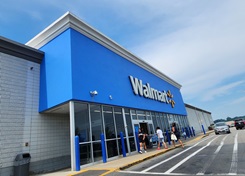
File name: Methuen.storefront.jpg
Good Photo: clear image of the storefront, sidewalk
and
part of the parking area. The file is properly named
with shopping name and property location.
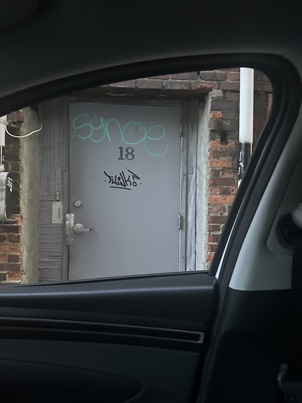
File name: IMG-2024-05-19.jpg
Bad photo. The file name needs to be changed to
Broughton.back entrance.jpg. This photo was
also
taken from inside a car, which we don't want.
The shopper needs to walk around the property
to make a
property inspection.
Questions: Please contact your
scheduler, June at
juneshopaudits@gmail.com.
|